
Understanding Apple BootROM Security: The Root of Trust Explained
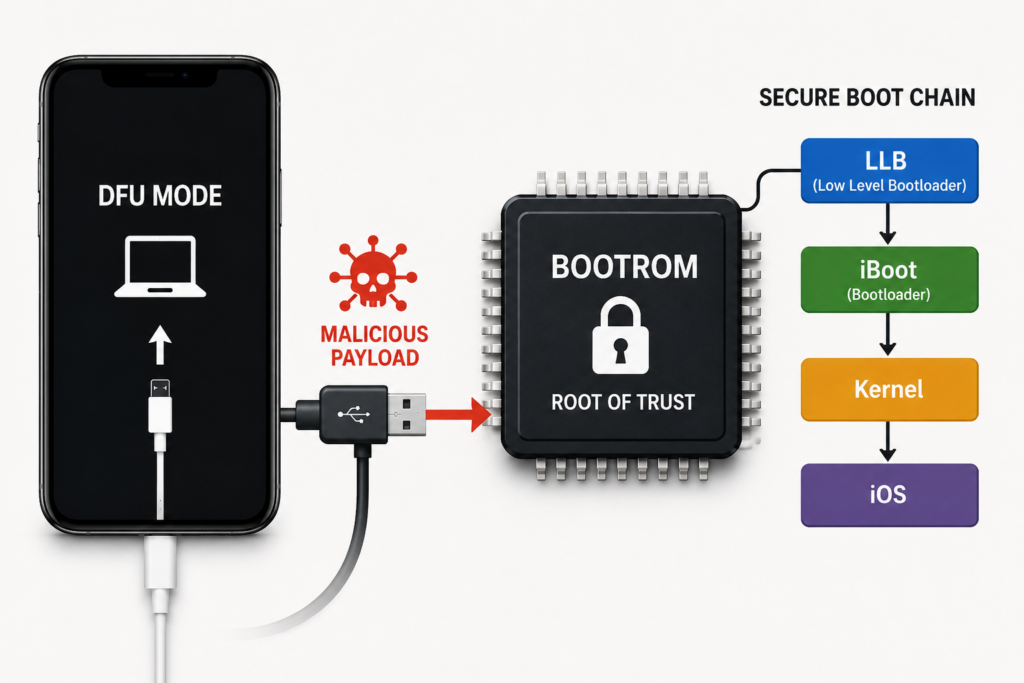
Apple devices are known for their strong security architecture.
At the center of that security lies one critical component:
BootROM
BootROM is the very first code executed when an iPhone powers on.
It is the foundation of Apple’s secure boot system.
Everything that loads after it depends on BootROM trust.
This includes:
- iBoot
- iOS kernel
- Secure Enclave initialization
- Firmware verification
- Recovery systems
If BootROM is secure, the chain remains secure.
If BootROM is compromised, the entire trust chain can collapse.
This article explains:
- what Apple BootROM is
- how BootROM security works
- how secure boot starts
- how DFU mode is implemented
- how signature verification happens
- where vulnerabilities like checkm8 exist
What is BootROM?
BootROM (Boot Read-Only Memory) is a hardware-level immutable program stored inside Apple’s SoC.
It is physically burned into silicon.
This means:
- it cannot be modified
- it cannot be patched
- it cannot be erased
Its purpose is simple:
Start the device securely.
BootROM is the root of trust.
Without it, nothing else can be trusted.
Why BootROM is the Root of Trust
Apple uses a secure boot chain.
The chain:
BootROM
↓
LLB
↓
iBoot
↓
Kernel
↓
iOS
Each stage verifies the next stage using cryptographic signatures.
This ensures:
Only Apple-signed software can run.
BootROM starts this verification process.
That makes it the trust anchor.
If BootROM fails:
Everything after it becomes vulnerable.
What Happens When an iPhone Powers On?
Power-on sequence:
1. Hardware Reset
CPU starts execution from a fixed address.
This address points into BootROM.
No storage access yet.
Only ROM.
2. BootROM Initializes Hardware
BootROM sets up:
- CPU state
- memory controllers
- USB stack
- NAND interface
- security registers
This prepares the device.
3. BootROM Checks Boot Source
BootROM decides where to load from:
Possible sources:
- NAND storage
- Recovery mode
- DFU mode
Normal path:
NAND.
Failure path:
Recovery.
Manual override:
DFU.
How BootROM Verifies Apple Firmware
This is one of BootROM’s most important jobs.
Before loading LLB:
BootROM verifies its signature.
Verification includes:
- hash checking
- RSA/ECDSA validation
- certificate chain validation
Simplified:
Firmware → Hash
Hash → Signature
Signature → Apple Public Key
If valid:
Continue.
If invalid:
Reject.
This prevents unsigned bootloaders.
Apple Public Keys Inside BootROM
BootROM contains Apple’s embedded public keys.
These are hardcoded.
Used for:
- signature verification
- trust validation
- secure boot enforcement
Important:
Private keys are never inside the device.
Only public keys.
This allows verification but not signing.
What is SecureROM?
People often use BootROM and SecureROM interchangeably.
Technically:
SecureROM = Apple’s secure BootROM implementation.
Its responsibilities:
- initialize trust
- verify firmware
- handle DFU mode
- enforce anti-rollback
It is the first security layer.
Understanding DFU Mode in BootROM
DFU = Device Firmware Update.
DFU exists inside BootROM.
This is important.
Because:
Even if NAND is damaged, DFU still works.
DFU allows:
- firmware restoration
- low-level communication
- exploit entry points
In DFU:
Only BootROM is active.
No iOS.
No iBoot.
This is why BootROM attacks target DFU.
How BootROM Handles USB Communication
In DFU:
BootROM exposes USB interface.
Vendor ID:
0x05AC
Common DFU Product ID:
0x1227
It accepts:
- control transfers
- setup packets
- DFU commands
Important DFU commands:
DFU_DNLOAD
DFU_UPLOAD
DFU_GETSTATUS
DFU_ABORT
This USB parser is where many BootROM vulnerabilities exist.
Example:
checkm8.
BootROM and the Secure Enclave (SEP)
BootROM also helps initialize the Secure Enclave Processor (SEP).
SEP handles:
- passcode validation
- biometric authentication
- encryption keys
BootROM establishes:
secure communication channels.
Important:
Even if BootROM is exploited:
SEP remains independently protected.
This is why encrypted user data is still hard to access.
Anti-Rollback Protection
Apple prevents older firmware installs.
BootROM enforces this.
Uses:
- nonce generation
- signing tickets (SHSH)
- firmware policy checks
This prevents:
downgrading to vulnerable iOS versions.
This is a critical security feature.
What Happens if BootROM is Exploited?
This is the worst-case scenario.
Example:
checkm8.
If BootROM is exploited:
Attacker gains:
- code execution before iBoot
- secure boot patching
- custom boot environments
- unsigned payload execution
This breaks:
Apple’s chain of trust.
But:
It does NOT automatically bypass SEP.
That’s important.
Why BootROM Vulnerabilities are Dangerous
BootROM bugs are permanent.
Because BootROM cannot be patched.
Only hardware revision fixes them.
Example:
checkm8 affected:
A5 → A11
Not affected:
A12+
This shows how serious BootROM bugs are.
Real-World Technician Usage of BootROM Knowledge
Understanding BootROM helps in:
1. DFU Diagnostics
Low-level communication.
2. Ramdisk Loading
Custom environments.
3. Panic Log Analysis
Boot diagnostic systems.
4. NAND Repair
Storage-level debugging.
5. Activation State Analysis
Low-level boot access.
6. Forensics
Evidence extraction.
Common Misconceptions About BootROM
“BootROM exploit means full unlock”
False.
It only gives low-level execution.
“BootROM exploit bypasses encryption”
False.
SEP protects encryption.
“BootROM can be patched”
False.
It is hardware.
Why Apple BootROM Security Matters
BootROM is the first and most important security layer.
It defines:
- what can boot
- what can execute
- what is trusted
Everything starts here.
This makes BootROM one of the most critical components in Apple security.
For technicians, security researchers, and repair professionals:
Understanding BootROM means understanding the foundation of iPhone trust.
And in low-level iPhone work, trust is everything.
Frequently Asked Questions (FAQ)
What is Apple BootROM?
BootROM is the first immutable code executed when an iPhone powers on.
Can BootROM be updated?
No. BootROM is burned into silicon.
What does BootROM verify?
It verifies the next boot stage (LLB).
Is DFU mode inside BootROM?
Yes. DFU is implemented directly in BootROM.
Why is checkm8 important?
Because it exploits BootROM itself.