
Recovery Mode vs DFU Mode: What’s the Real Difference?
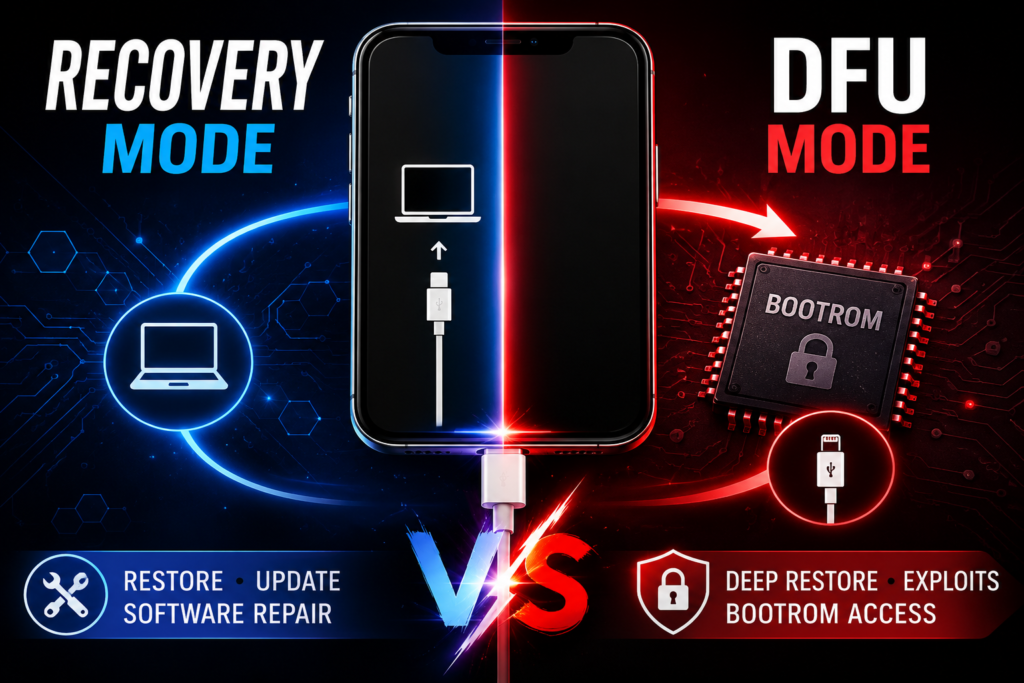
For most users, Recovery Mode and DFU Mode (Device Firmware Update) look similar—they both involve plugging an iPhone into a computer for restoring.
But internally, they are completely different.
For technicians, reverse engineers, and repair professionals, understanding this distinction is critical.
Recovery Mode operates at the iBoot layer, while DFU Mode operates directly inside the BootROM, making DFU the lowest software-accessible state on an iPhone.
This difference affects:
- Firmware restores
- Baseband recovery
- NAND diagnostics
- Exploit delivery
- Boot chain analysis
- Activation troubleshooting
Understanding the iPhone Boot Chain First
To understand the difference, you need the Apple boot sequence:
Stage 1: BootROM (SecureROM)
BootROM is hardcoded in silicon.
Responsibilities:
- Initializes hardware
- Verifies next-stage bootloader
- Handles DFU mode
- Enforces root-of-trust
BootROM cannot be patched after manufacturing.
This is why exploits like checkm8 are powerful.
Related:
How checkm8 Works: Apple’s BootROM Exploit Explained
Stage 2: LLB (Low-Level Bootloader)
Loads after BootROM.
Responsibilities:
- More hardware init
- Signature verification
Modern devices sometimes merge this functionality.
Stage 3: iBSS / iBEC
Temporary boot stages for restore.
Used heavily during restore operations.
Related:
iBSS and iBEC Explained
Stage 4: iBoot
iBoot is Apple’s main bootloader.
Responsibilities:
- Loads iOS kernel
- Handles Recovery Mode
- Communicates with Finder/iTunes
- Verifies firmware
Recovery Mode exists here.
What is Recovery Mode?
Recovery Mode is an iBoot-level restore state.
When entering Recovery Mode:
Boot flow reaches iBoot successfully.
Then iBoot waits for restore instructions.
This means:
BootROM → LLB → iBSS → iBEC → iBoot → Recovery
Important:
iBoot is already running.
That means:
- Signature checks are active
- Secure boot enforcement remains
- Exploits like checkm8 cannot trigger here
Recovery Mode Screen
Usually shows:
- Computer icon
- Cable icon
Modern versions may display the restore screen.
How Recovery Mode Works Internally
When connected over USB:
iBoot exposes a USB interface.
Host tools communicate using:
- USBMUX
- Recovery protocol
- Restore services
The computer sends:
- iBSS
- iBEC
- Restore Ramdisk
- KernelCache
- Filesystem images
iBoot verifies every stage.
No unsigned code allowed.
Recovery Mode USB Identification
Typical USB Product IDs:
- Recovery: 0x1281
Vendor:
- Apple (0x05AC)
This tells technicians:
The device has reached iBoot.
What is DFU Mode?
DFU Mode is BootROM-level firmware mode.
This is much lower.
Boot flow stops here:
BootROM → DFU
Nothing else loads.
No iBoot.
No kernel.
No iOS.
No filesystem.
Just BootROM.
This makes DFU the purest restore state.
DFU Mode Screen
Screen stays completely black.
This confuses beginners.
But for technicians:
Black screen = good.
If logo appears, it’s not DFU.
How DFU Works Internally
Inside BootROM:
Apple implements USB DFU protocol.
DFU supports commands like:
- DFU_DNLOAD
- DFU_UPLOAD
- DFU_GETSTATUS
- DFU_CLRSTATUS
These use raw USB control transfers.
Example:
Used by libusb.
This is where:
- checkm8 injects payloads
- ipwndfu communicates
- PongoOS boots
- ramdisks load
Related:
How libusb Works with iPhone DFU Mode
DFU USB Identification
Typical IDs:
- DFU: 0x1227
Vendor:
- Apple (0x05AC)
This indicates:
Device is still inside BootROM.
Recovery Mode vs DFU Mode: Internal Comparison
1. Software Layer
Recovery Mode:
Runs inside iBoot.
DFU Mode:
Runs inside BootROM.
This is the biggest difference.
2. Security Level
Recovery:
Higher-level security.
DFU:
Lowest-level secure entry.
Closer to silicon.
3. Exploitability
Recovery:
Harder.
iBoot-level vulnerabilities only.
DFU:
BootROM vulnerabilities possible.
Example:
checkm8.
4. Restore Depth
Recovery:
Normal restore.
DFU:
Deep restore.
Can recover severe corruption.
5. NAND Access
Recovery:
Limited.
DFU:
Better for custom ramdisk workflows.
Useful for:
- NAND diagnostics
- data extraction
- forensic imaging
When Technicians Use Recovery Mode
Use Recovery when:
- iPhone is stuck on logo
- standard restore needed
- update failed
- boot loop still reaches iBoot
Good for:
- software issues
- minor corruption
- update failures
When Technicians Use DFU Mode
Use DFU when:
- boot chain is damaged
- iBoot corrupted
- Recovery fails
- exploit delivery required
- BootROM research
- deep restore needed
Critical for:
- checkm8 devices
- NAND-level diagnostics
- activation investigations
- panic analysis workflows
Why checkm8 Requires DFU
checkm8 targets BootROM.
Not iBoot.
That means:
Recovery Mode is too late.
The vulnerability exists before iBoot loads.
This is why tools like:
- checkra1n
- palera1n
- ipwndfu
require DFU mode.
Common Technician Mistakes
Mistaking black screen for dead device
In DFU:
black screen is correct.
Entering Recovery instead of DFU
Apple logo appearing means timing failed.
Assuming Recovery can exploit BootROM
Impossible.
BootROM stage already passed.
Which One Should You Use?
If you want:
Quick restore → Recovery Mode
Deep-level restore → DFU Mode
BootROM exploit → DFU Mode
Low-level diagnostics → DFU Mode
Standard firmware reinstall → Recovery Mode
For technicians:
DFU is the more powerful state.
Recovery is the safer, easier state.
FAQ
Is DFU Mode better than Recovery Mode?
For deep repair work, yes.
For normal restores, Recovery is enough.
Can checkm8 work in Recovery Mode?
No.
It requires BootROM DFU.
Why is DFU screen black?
Because no graphical boot stage has loaded.
Only BootROM is active.
Can DFU fix more issues?
Yes.
Because it bypasses iBoot-level failures.
Related Links
- How checkm8 Works Internally
- How libusb Works with iPhone DFU Mode
- iBSS and iBEC Explained
- How Ramdisks Work in iPhone Diagnostics