
Tristar / Hydra IC Failure Symptoms Explained
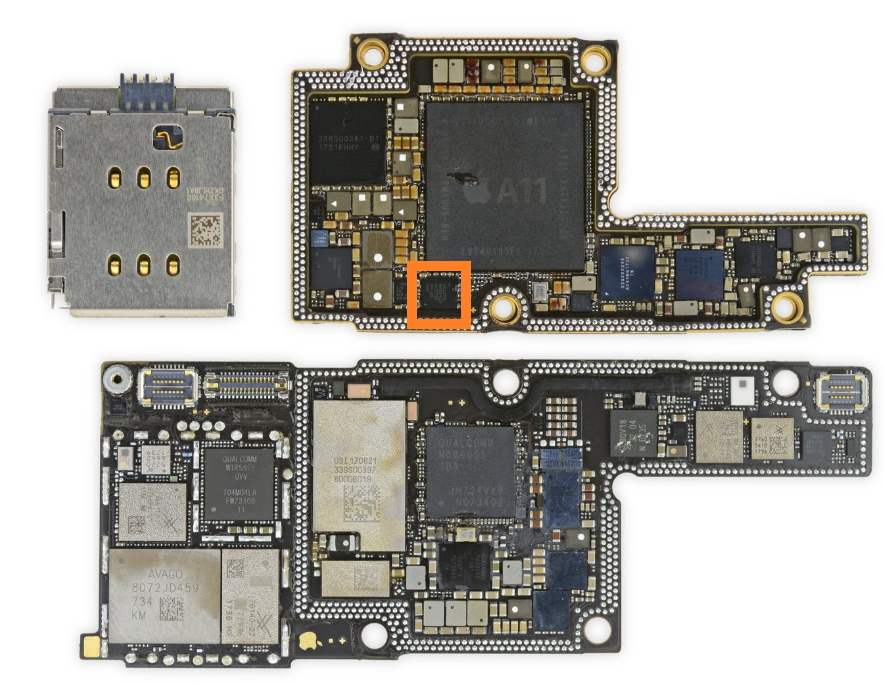
iPhone x motherboard
One of the most common charging-related failures in iPhones is linked to the Tristar IC (older models) or Hydra IC (newer models).
For board-level technicians, understanding these IC failures can dramatically reduce diagnostic time.
Because many charging faults are not battery-related.
They are communication-related.
This is where Tristar and Hydra become critical.
What is Tristar / Hydra?
The Tristar IC (also known as U2 IC) is the USB communication and charging negotiation controller used in older iPhones.
Its job includes:
- USB data communication
- charger authentication
- current negotiation
- battery charging handshake
- accessory detection
Hydra is its newer evolution.
Found in later models with improved integration.
Think of it as the traffic controller between:
Charging Port → Power Management IC → CPU
If it fails:
charging behavior becomes abnormal.
Which iPhones Use Tristar?
Generally:
Tristar Models
- iPhone 5
- iPhone 5s
- iPhone 6
- iPhone 6 Plus
- iPhone 6s
- iPhone 6s Plus
- iPhone 7
- iPhone 7 Plus
Hydra Models
Usually:
- iPhone 8 and newer
Architecture varies.
Common Symptoms of Tristar / Hydra Failure
Recognizing the symptoms is the fastest path.
1. Phone Not Charging
Most common symptom.
Behavior:
- charger detected
- battery percentage frozen
- charges extremely slowly
- random stop charging
Cause:
Failed current negotiation.
Very common.
2. High Current Draw on DC Supply
Typical behavior:
- abnormal current immediately
- unstable pulsing
- inconsistent idle draw
This often indicates:
- internal IC short
- damaged USB communication path
Important clue.
3. Device Boots Only on Charger
Battery alone may not boot the phone.
Reason:
Battery power routing logic becomes unstable.
Tristar can interfere with battery handshake.
Common symptom.
4. Fast Battery Drain
Even with healthy battery.
Cause:
Tristar may stay active or leak current.
Symptoms:
- standby drain
- slight heat near charging section
Often overlooked.
5. Not Detected by Computer
Connect to:
- iTunes
- Finder
Possible behavior:
- no detection
- connect/disconnect loop
- no DFU recognition
Strong USB communication failure indicator.
6. Stuck in Recovery / Restore Errors
Can be linked to Tristar faults.
Common restore errors:
4013
4014
9
Not always Tristar.
But should be checked.
Related:
Recovery Mode vs DFU Mode
Main Causes of Failure
Fake or Low-Quality Chargers
Biggest cause.
Cheap chargers can send unstable voltage spikes.
This damages:
- VBUS line
- negotiation circuits
- USB communication paths
This is why Apple Inc. introduced MFi authentication.
Power Surges
Unstable adapters can stress Tristar.
Repeated surges weaken internal logic.
Liquid Damage
Corrosion around:
- Tristar IC
- charging port lines
- USB data lines
Very common repair case.
Port Shorting
Damaged charging ports can backfeed voltage.
This can instantly kill Tristar.
Common after bent pins.
Technician Diagnostic Workflow
Step 1: Check Charger Detection
Observe:
- charging icon
- stable current intake
- negotiation behavior
Use USB meter.
Very useful.
Step 2: Test on DC Supply
Look for:
- boot current pattern
- abnormal idle draw
- pulsing
Patterns tell a lot.
Step 3: USB Detection Test
Connect to PC.
Check:
- enumeration
- disconnect loops
- DFU detection
Failure here strongly points to Tristar.
Step 4: Measure Key Lines
Important lines:
- PP5V0_USB
- USB_DP
- USB_DM
- VBUS
Check for:
- shorts
- missing resistance
- corrosion damage
Critical.
Step 5: Thermal Inspection
Use thermal camera.
A hot Tristar often confirms internal short.
Very reliable.
Common Technician Mistakes
Avoid:
❌ Replacing battery first
❌ Replacing charging port blindly
❌ Assuming every no-charge issue is Tristar
❌ Ignoring USB data lines
❌ Missing corrosion under IC
Always verify.
Repair Methods
Depends on diagnosis.
Possible fixes:
- Tristar replacement
- Hydra replacement
- USB line repair
- charging port replacement
- corrosion cleaning
Important:
Use quality ICs.
Pad damage is common.
Proper temperature matters.
Why Tristar Failures Matter
Because they affect more than charging.
They can break:
- USB communication
- restore mode
- DFU detection
- battery management
- accessory communication
This makes them high-priority repair points.
Final Thoughts
Tristar and Hydra failures are among the most common charging faults in iPhones.
Fastest clues:
✔ Not charging
✔ Fast battery drain
✔ No USB detection
✔ Restore errors
✔ Boot only on charger
✔ Random current draw
For technicians:
Tristar diagnosis should always be part of the charging fault workflow.
Understanding the charging handshake path makes diagnosis much faster.
FAQ
Can Tristar cause no charging?
Yes.
It controls charging negotiation.
Can Tristar affect USB detection?
Yes.
It manages USB communication lines.
Can Hydra fail like Tristar?
Yes.
Same concept, newer architecture.
Can bad chargers kill Tristar?
Very commonly.
Cheap chargers are a major cause.
Internal Reference
- Baseband Fault Identification in iPhone Logic Boards
- Recovery Mode vs DFU Mode
- Panic Log Analysis for Hardware Fault Detection
- How checkm8 Works Internally
- iPhone Boot Process Deep Dive