
How libusb Communicates with iPhone DFU Mode: Packet-Level Analysis, Exploit Flow, and Practical Examples
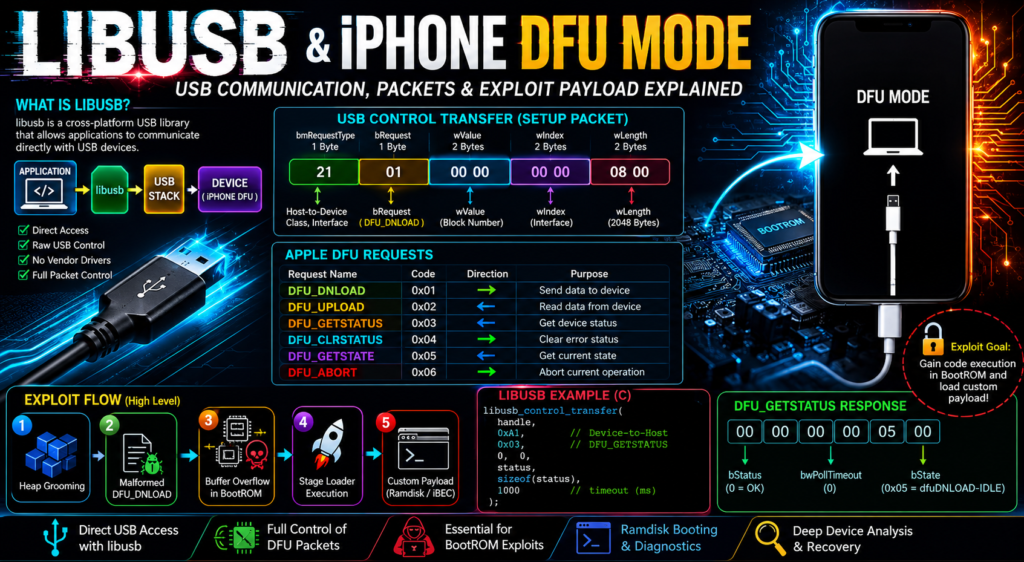
When dealing with low-level iPhone communication—especially in DFU (Device Firmware Update) mode—most technicians hear the word libusb, but very few understand what it actually does internally.
For people working in:
- iPhone servicing
- Activation analysis
- BootROM exploitation
- Custom ramdisk loading
- Device recovery
- Security research
understanding libusb is essential.
This article explains:
- How libusb works
- How iPhone DFU communicates over USB
- How packet structures look
- How exploit payload delivery works
- How to build your own DFU communication tools
- Real code examples
What is libusb?
libusb is a cross-platform userspace USB communication library.
Unlike vendor drivers, libusb allows direct communication with USB devices.
Normal USB communication:
Application → OS Driver → USB Stack → Device
With libusb:
Application → libusb → USB Stack → Device
This means you can manually send:
- Setup packets
- Control transfers
- Bulk transfers
- Interrupt transfers
This is critical for iPhone DFU communication.
What is iPhone DFU Mode?
DFU (Device Firmware Update) is a low-level recovery state built into Apple’s BootROM.
In DFU mode:
- iOS is not loaded
- iBoot may not be loaded
- Secure boot chain is minimal
- USB communication happens directly with BootROM
This is why DFU is important.
The BootROM becomes the USB responder.
Device identifiers:
Vendor ID:
0x05AC
Common Product IDs:
0x1227 → DFU mode
0x1281 → Recovery mode
When connected, the host can enumerate the device and communicate through USB.
USB Communication Structure in DFU
DFU uses Endpoint 0 (EP0).
Endpoint 0 is the universal control endpoint.
Every USB device must have it.
Control transfers use three stages:
- Setup Stage
- Data Stage
- Status Stage
Flow:
Host → SETUP
Host ↔ DATA
Device → STATUS
This is how all DFU commands work.
Understanding the USB SETUP Packet
Every control request starts with an 8-byte setup packet.
Structure:
| Field | Size |
|---|---|
| bmRequestType | 1 byte |
| bRequest | 1 byte |
| wValue | 2 bytes |
| wIndex | 2 bytes |
| wLength | 2 bytes |
Example:
21 01 0000 0000 0800
Breaking it down:
bmRequestType = 0x21
Host-to-device
Class request
Interface recipient
bRequest = 0x01
DFU_DNLOAD
wValue = 0
Block number
wIndex = 0
Interface number
wLength = 0x0800
2048 bytes payload
Meaning:
“Download this 2048-byte chunk.”
Apple DFU Requests
The iPhone BootROM supports standard DFU commands.
DFU_DNLOAD (0x01)
Used to send data.
Examples:
- Firmware chunks
- Exploit payloads
- Stage loaders
DFU_UPLOAD (0x02)
Used to read data back.
Less common in Apple DFU.
DFU_GETSTATUS (0x03)
Checks state machine status.
Returns:
- status
- timeout
- current state
DFU_CLRSTATUS (0x04)
Clears error conditions.
DFU_GETSTATE (0x05)
Returns current DFU state.
DFU_ABORT (0x06)
Cancels current transfer.
Often used in exploit heap grooming.
How libusb Sends These Commands
libusb uses:
libusb_control_transfer()
This function allows raw control packet creation.
Structure:
libusb_control_transfer(
    device_handle,
    bmRequestType,
    bRequest,
    wValue,
    wIndex,
    data,
    length,
    timeout
);
This directly maps to USB SETUP packets.
Example:
libusb_control_transfer(
    dev,
    0x21,
    1,
    0,
    0,
    payload,
    0x800,
    1000
);
This sends a DFU_DNLOAD request.
Normal DFU Firmware Transfer Flow
During a normal restore:
Step 1:
Host sends chunk 0
Step 2:
Device stores data
Step 3:
Host asks for status
Step 4:
Repeat for next chunk
Sequence:
DFU_DNLOAD(block 0)
DFU_GETSTATUS
DFU_DNLOAD(block 1)
DFU_GETSTATUS
DFU_DNLOAD(block 2)
DFU_GETSTATUS
Until finished.
Final chunk triggers manifest stage.
How Exploit Payloads Work
This is where things get interesting.
BootROM exploits (like checkm8) do not use DFU normally.
Instead they abuse:
- malformed packet sizes
- memory corruption
- heap fragmentation
- timing races
Goal:
Gain arbitrary code execution inside BootROM.
Exploit Stage 1: Heap Grooming
Before triggering overflow:
Attackers shape memory.
Commands used:
DFU_ABORT
DFU_CLRSTATUS
GET_DESCRIPTOR
Purpose:
Create predictable heap layout.
Example:
Allocate
Free
Allocate
Free
Memory:
[Buffer A]
[Hole]
[Buffer B]
This prepares target memory.
Exploit Stage 2: Oversized Payload
A crafted DFU_DNLOAD packet is sent.
Normal:
0x800 bytes
Exploit:
0x900+ bytes
If BootROM copies without bounds checking:
Buffer overflow occurs.
Result:
Overwrite:
- function pointers
- return addresses
- metadata
This corrupts execution flow.
Exploit Stage 3: USB Reset Timing
Timing is critical.
After corruption:
USB reset may be triggered.
Methods:
- physical reconnect
- software reset
- port reset
Why?
Because BootROM changes states after reset.
Sometimes this triggers vulnerable code paths.
Exploit Stage 4: Stage Loader Upload
After successful corruption:
Small loader is injected.
Usually:
Stage 1 loader → initializes environment
Then:
Stage 2 payload:
Examples:
- PongoOS
- Ramdisk
- Custom iBEC
Execution chain:
BootROM
↓
Exploit
↓
Payload loader
↓
Custom boot chain
Practical Use Cases
1. Device Detection Tools
Used in:
- recovery utilities
- DFU detection scripts
Example:
Detect if phone entered DFU.
2. Ramdisk Booting
Upload custom boot environments.
Useful for:
- data extraction
- NAND diagnostics
- filesystem analysis
3. BootROM Exploitation
Used in:
- checkm8
- research tools
Allows secure boot bypass.
4. Panic Log Analysis Tools
DFU communication can be used to:
- boot diagnostic ramdisks
- collect low-level logs
- patch environment for analysis
Sample Program: Detect and Communicate with DFU Device
This simple program:
- initializes libusb
- finds Apple DFU
- opens device
- sends DFU_GETSTATUS
- prints response
#include <stdio.h>
#include <libusb.h>

#define APPLE_VID 0x05AC
#define DFU_PID   0x1227

int main() {
    libusb_device_handle *handle;
    unsigned char status[6];
    int ret;

    libusb_init(NULL);

    handle = libusb_open_device_with_vid_pid(NULL, APPLE_VID, DFU_PID);

    if (!handle) {
        printf("DFU device not found\n");
        return -1;
    }

    printf("Device found\n");

    libusb_claim_interface(handle, 0);

    ret = libusb_control_transfer(
        handle,
        0xA1,      // Device to host
        0x03,      // DFU_GETSTATUS
        0,
        0,
        status,
        sizeof(status),
        1000
    );

    if (ret > 0) {
        printf("Status received:\n");

        for (int i = 0; i < ret; i++) {
            printf("%02X ", status[i]);
        }

        printf("\n");
    } else {
        printf("Control transfer failed\n");
    }

    libusb_release_interface(handle, 0);
    libusb_close(handle);
    libusb_exit(NULL);

    return 0;
}
How This Program Works
Step-by-step:
- Initialize libusb
- Search Apple DFU VID/PID
- Open USB handle
- Claim interface 0
- Send GETSTATUS packet
- Read returned status bytes
- Close device
Packet sent:
bmRequestType = 0xA1
bRequest = 0x03
This asks BootROM:
“What is your current DFU state?”
Response example:
00 00 00 00 05 00
Meaning:
Status OK
State = dfuDNLOAD-IDLE
Final Thoughts
libusb is not the exploit itself.
It is the transport mechanism.
Its power lies in:
- precise packet crafting
- exact control transfers
- timing manipulation
- raw endpoint access
For technicians, reverse engineers, and exploit developers, mastering libusb means understanding the very first layer of trust between the host and the iPhone.
And in low-level iOS work, that layer is everything.
Related Links
- How checkm8 Works Internally
- Understanding Apple BootROM Security
- iPhone Recovery Mode vs DFU Mode Explained
- What is iBSS and iBEC
Further Reading & References
1. libusb Official Website
Best primary source.
Useful for:
- API documentation
- backend architecture
- platform support
2. libusb API Documentation
Useful for:
libusb_control_transfer()- device enumeration
- endpoint handling
- asynchronous transfers
Very useful because your article includes code examples.
USB Protocol References
3. USB Device Firmware Upgrade (DFU) Specification
Useful for:
- DFU state machine
- DFU_DNLOAD
- DFU_UPLOAD
- DFU_GETSTATUS
Important for explaining Apple’s DFU behavior.
4. USB 2.0 Specification
Useful for:
- setup packets
- endpoint architecture
- transfer types
- descriptor formats
Good foundational reference.
Apple DFU / BootROM References
5. Apple Platform Security Guide
Useful for:
- secure boot chain
- BootROM role
- DFU recovery process
Adds strong authority.
6. The iPhone Wiki (DFU Mode)
The iPhone Wiki DFU Mode Reference
Useful for:
- DFU PIDs
- mode behavior
- boot sequence
Very technician-friendly.
Exploit / Practical References
7. ipwndfu (checkm8 implementation)
Useful for:
- practical libusb DFU exploitation
- real-world packet crafting
- BootROM payload injection
Highly relevant.
8. PongoOS
Useful for:
- post-exploit payload staging
- custom boot environments
Good for showing what happens after libusb delivery.
Reverse Engineering / USB Analysis Tools
9. Wireshark USB Capture
Useful for:
- analyzing USB packets
- monitoring DFU communication
- debugging libusb transfers
Very useful for readers wanting packet-level visibility.
10. USBPcap
Useful for:
- capturing USB traffic on Windows
- analyzing libusb requests
Excellent for Windows technicians.